

While removing Site Content Type you got the error that "The content type "My Content Type" is part of an application feature". The fix is rather easy and simple.
While removing Site Content Type you got the error that "The content type "My Content Type" is part of an application feature". The fix is rather easy and simple.
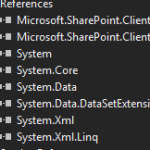
Simple console application, which get data from SharePoint list and displays it. It's very good solution if SharePoint is used as a storage of rates, catalogs, libraries etc.
To use SharePoint Client model you should add references to Microsoft.SharePoint.Client.dll and Microsoft.SharePoint.Client.Runtime.dll in your solution. (read more...)
Most of all I use PowerShell for administration of SharePoint portal. But also I use it when I need to make some actions with SharePoint lists – get items, update items, remove items (link how to remove items) or to make report based on lists on SharePoint. (read more...)

In this post I write some examples of C# coding for SharePoint list items. These methods are rather fast and it's very actual for SharePoint. (read more...)
If you removed a number of SharePoint list items (moved to Recycle Bin), I think you want to clean the Recycle from them. Of course you can remove them manually but it’s not a good idea if you have deleted 10000 records or more (Remove a lot of elements from very large SharePoint Lists). (read more...)
Lists in SharePoint is only look like database tables but not they are. For some things they are even better than databases – for common users for example, but for developers and administrators they are often not so good and friendly. (read more...)
While migration system and its data to SharePoint application there was a task to save logs of change from old system data. Some authors of changes have already retired - some of them are disabled in Active Directory, others – deleted at all. (read more...)
Once I needed a CAML query for selecting elements with non-empty column. I wanted to select all the users with name detected (filled) and with OS "Windows".
First I decided to use <Neq> construction and <Value Type='Text'></Value>. I thought it’s an analog for var != "". But the result was wrong. (read more...)
In a list with a field type “Choice” you can know available options of this field from codebehind without reading all list values and not making them unique with Distinct(). Especially, you can’t just read and make Distinct() list values if your field allows multiple choice or if you don't have all options. (read more...)
Working with SharePoint lists I often use lookup values. But when I write C# solutions for lists I have some difficulties with LookUp Values. Trying to get LookUp Value as string it looks like "213;#lookup value". (read more...)