
Find out memory configuration in Windows using PowerShell
Once I need to install more memory on my server. The server was installed long ago and nobody knows what memory is installed there and whether there are free slots for memory.
The real administrator is too lazy to go to server, open it and watch the memory installed. The real administrator wants to enter some letters or make some mouse clicks. So, on Windows Server 2008, or even on Windows 7, you may run PowerShell and enter
Get-WmiObject Win32_PhysicalMemory
The result of this command is not very readable.
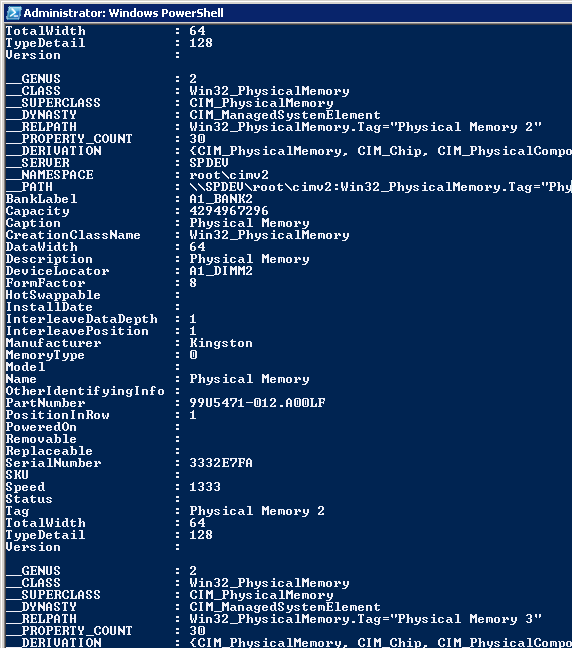
Get-WmiObject Win32_PhysicalMemory Result
The result of this command is not very readable.
I recommend you to use more readable command.
Get-WmiObject Win32_PhysicalMemory | select BankLabel,DeviceLocator,Capacity,Manufacturer,PartNumber,SerialNumber,TotalWidth,Speed
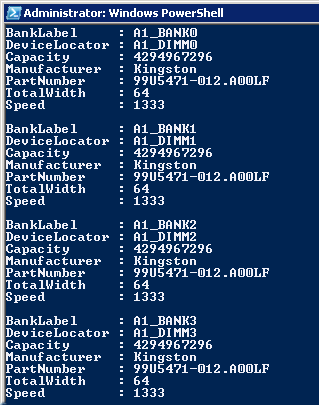
Readable information about memory
After “select” you can write the fields you need. The list of names you can take from unreadable query.
 Net 10.0 is not available for Azure Functions. How to fix
 Custom Label with multiple styles in TextField of Fluent UI
 First impressions after using the new SPFX 1.22.2 with Heft