
Associative arrays in C# via IDictionary

There’re no associative arrays (hash) in common sense. There are Dictionaries for this. It’s a very good tool if you want to use link "key-value". Using Dictionaries, keys and values can be different types.
For creating associative array in C# you should initialize IDictionary and set types for keys and values:
            //initialize IDictionary
            IDictionary<string, int> arrayStat = new Dictionary<string, int>();

            //add values to IDictionary arrayStat
            arrayStat.Add("blue", 4);
            arrayStat.Add("red", 2);
            arrayStat.Add("green", 10);

            //Display keys and values of arrayStat Idictionary
            foreach (KeyValuePair<string, int> elm in arrayStat)
            {
                Console.WriteLine("Key: " + elm.Key + ", value: " + elm.Value);
            }
The result is:
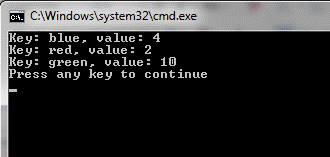
Figure 1
Keys in IDictionary must be unique. If you try to add element with the existing key (for example, if you add string "arrayStat.Add("green", 20);" ), you will get the error:
Unhandled Exception: System.ArgumentException: An item with the same key has already been added. at System.Collections.Generic.Dictionary '2.Insert(TKey key, TValue value, Boolean add) at dicts.Program.Main(String[] args) in c:\Projects\Visual Studio 2013\Projects\dicts\dicts\Program.cs:line 19
If you fill IDictionary manually, I don’t think you see this error. But if you work with database results or calculations, it’s easy to get this error.
Let’s try to add keys-values to IDictionary from List.
We have a class SimpleClass:
        public class SimpleClass
        {
            public int quantity {get; set;}
            public string Color { get; set; }
        }
Let’s initialize List<SimpleClass> and add values to it:
           //Initialize Collection List<SimpleClass>
            List<SimpleClass> myItems = new List<SimpleClass>();
            myItems.Add(new SimpleClass { quantity = 4, Color = "blue" });
            myItems.Add(new SimpleClass { quantity = 2, Color = "green" });
            myItems.Add(new SimpleClass { quantity = 8, Color = "yellow" });
            myItems.Add(new SimpleClass { quantity = 12, Color = "cyan" });
            myItems.Add(new SimpleClass { quantity = 3, Color = "magenta" });
            myItems.Add(new SimpleClass { quantity = 15, Color = "black" });
Now let’s fill IDictionary from List<SimpleClass>:
            //add values to IDictionary arrayStat from List<SimpleClass> myItems
            foreach (SimpleClass item in myItems)
            {
                arrayStat.Add(item.Color, item.quantity);
            }

            //Display keys and values of arrayStat Idictionary
            foreach (KeyValuePair<string, int> elm in arrayStat)
            {
                Console.WriteLine("Key: " + elm.Key + ", value: " + elm.Value);
            }
The result is expectable:
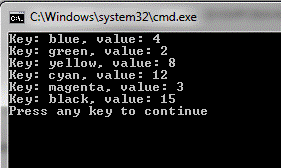
Figure 2
Now let’s modify collection List<SipleClass> and build and execute program:
            //Initialize Collection List<SimpleClass>
            List<SimpleClass> myItems = new List<SimpleClass>();
            myItems.Add(new SimpleClass { quantity = 4, Color = "blue" });
            myItems.Add(new SimpleClass { quantity = 2, Color = "green" });
            myItems.Add(new SimpleClass { quantity = 8, Color = "yellow" });
            myItems.Add(new SimpleClass { quantity = 12, Color = "cyan" });
            myItems.Add(new SimpleClass { quantity = 3, Color = "magenta" });
            myItems.Add(new SimpleClass { quantity = 15, Color = "black" });
            myItems.Add(new SimpleClass { quantity = 341, Color = "blue" });
            myItems.Add(new SimpleClass { quantity = 22, Color = "green" });
            myItems.Add(new SimpleClass { quantity = 12, Color = "yellow" });
            myItems.Add(new SimpleClass { quantity = 123, Color = "cyan" });
            myItems.Add(new SimpleClass { quantity = 432, Color = "magenta" });
            myItems.Add(new SimpleClass { quantity = 34, Color = "black" });
Again we have error:
Unhandled Exception: System.ArgumentException: An item with the same key has already been added. at System.Collections.Generic.Dictionary '2.Insert(TKey key, TValue value, Boolean add) at dicts.Program.Main(String[] args) in c:\Projects\Visual Studio 2013\Projects\dicts\dicts\Program.cs:line 42
The error is in "arrayStat.Add(item.Color, item.quantity);". To fix the error, you need to check if the key already exists.
            //add and upate values to IDictionary arrayStat from List<SimpleClass> myItems
            foreach (SimpleClass item in myItems)
            {
                if (!arrayStat.ContainsKey(item.Color))
                {
                    //Add new IDictionary value
                    arrayStat.Add(item.Color, item.quantity);
                }
                else
                {
                    //Update existing IDictionary value
                    arrayStat[item.Color] = item.quantity;
                }
            }
Summary:
Initialize IDictionary:
IDictionary<string, int> arrayStat = new Dictionary<string, int>();
Add item to IDictionary:
arrayStat.Add(key, value);
Update item to IDictionary:
arrayStat[key] = value;
 Net 10.0 is not available for Azure Functions. How to fix
 Custom Label with multiple styles in TextField of Fluent UI
 First impressions after using the new SPFX 1.22.2 with Heft