
Make clickable div with jQuery according to tag "a href"

The task is to make clickable div tags. There are several div blocks in a page, each div contains a hyperlink with URL. You need to make so, that if you click on div element, you open a hyperlink.
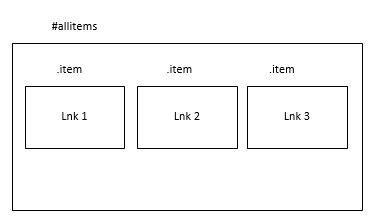
HTML-code of this construction is here:
<div id="allitems">
	<div class="item">
        <div class="vis"></div>
            <a href="url_1"><span>Link 1</span></a>
    </div>
    <div class="item">
        <div class="vis"></div>
            <a href="url_2"><span>Link 2</span></a>
    </div>
	<div class="item">
        <div class="vis"></div>
            <a href="url_3"><span>Link 3</span></a>
    </div>
</div>
The easiest way is to add a small Javascript code if you use jQuery. Of course, it must be added after jQuery loaded.
$(function () {
	$('.item').each(function() {
		$(this).on('click', function() {
			var lnk = $(this).find("a").attr('href');
			window.location = lnk;
		});
	});
});
 Net 10.0 is not available for Azure Functions. How to fix
 Custom Label with multiple styles in TextField of Fluent UI
 First impressions after using the new SPFX 1.22.2 with Heft