So we need to save our List<T> to XML file for something. For example, for work with it in Access. C# is great for this with using System.Xml.Serialization. There are only 4 strings of code to save an XML-file. (more...)

So we need to save our List<T> to XML file for something. For example, for work with it in Access. C# is great for this with using System.Xml.Serialization. There are only 4 strings of code to save an XML-file. (more...)
Once I needed a CAML query for selecting elements with non-empty column. I wanted to select all the users with name detected (filled) and with OS "Windows".
First I decided to use <Neq> construction and <Value Type='Text'></Value>. I thought it’s an analog for var != "". But the result was wrong. (more...)
In a list with a field type “Choice” you can know available options of this field from codebehind without reading all list values and not making them unique with Distinct(). Especially, you can’t just read and make Distinct() list values if your field allows multiple choice or if you don't have all options. (more...)
Today I needed to know a quantity of SharePoint List. Somewhy SharePoint doen't give this information using common tools. But using PowerShell it appeared to do easy. (more...)
With coming up Visual studio 2012 finally I decided to try it. But first I need to uninstall Visual Studio 2010. When I entered Control Panel -> Programs and Features I saw a lot of products that have been installed with VS 2010. It was hard to think about uninstalling each element manually. (more...)
Working with SharePoint lists I often use lookup values. But when I write C# solutions for lists I have some difficulties with LookUp Values. Trying to get LookUp Value as string it looks like "213;#lookup value". (more...)
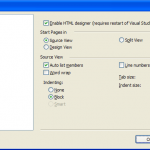
If your buttons Design, Split and Code in Visual Studio 2010 are missed but you need them, you should go to Tools->Options->HTML Designer->General, check "Enable HTML Designer" and restart studio. (more...)

To disable Java updates I tried to make it in common way – I have opened Control panel, selected Java (32-bit), in tab "Update" checked off "Check for Updates Automatically" and pressed Ok. But when I opened it again, this value was again "On" (Drawing 1). (more...)

For deleting SharePoint groups you can use SharePoint Designer. For this you should open site in SPDesigner, in left column goto "Site Groups", select groups for deleting and press Delete button on keyboard or in ribbon. But this process doesn't always work. And when I wanted to remove user groups SPDesigner hanged and reported error of deleting. (more...)
If you made a developer machine for SharePoint on Windows 7 (x64), you must remember - run visual studio only "Run as administrator" even if your account is administrator for developing SharePoint solutions.
Or you can turn off ULC but I don't recomend it.